 |
Your account registration information can be found by clicking on
the Account tab in
the software. It indicates the type of service you are using, when your
account was created, when it will expire and for how many more days you
can continue to use PlanetDNS Client before renewing your service subscription.
To view your Account Information
Click on the Account
 tab in the software. tab in the software.
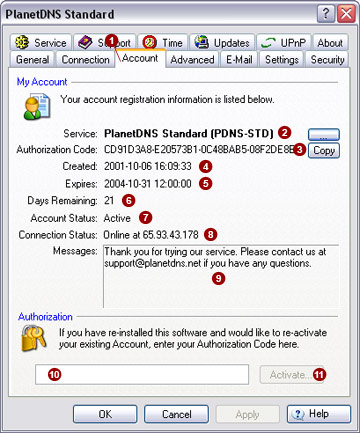
Service 
This field indicates the type of service you currently subscribe to.
By default, all installations of the software will indicate the service
level PlanetDNS Standard (PDNS-STD). For
information on all PlanetDNS service levels, click here.
Authorization
Code 
This field presents a unique code that applies to your installation
only. Please keep a record of this code in a safe place for future reference.
You will need to use this code to reactivate your account, if you reinstall
your PlanetDNS Client on another computer.
Created 
Shows the date the software was first activated and registered.
Expires

Shows the date your current service subscription will expire.
Days Remaining

Shows you how many days remain in your current service subscription,
or trial period.
Account Status

Indicates if your account is Active
or Expired. With your subscription
current, your account will be shown as being Active.
If it shows as being Expired,
your service period has ended and you will need to purchase a further
subscription before you can continue to use the software.
 NOTE: If the Account
Status is Expired, your Internet name can no longer be used to connect
to your computer. NOTE: If the Account
Status is Expired, your Internet name can no longer be used to connect
to your computer.
Connection Status

Indicates if your Internet name is Online
or Offline. Under normal operation,
your Internet name should always be Online.
When Online is displayed, PlanetDNS
Client is able to find an active Internet connection to your computer.
As well, you can use your Internet name to access your computer over the
Internet.
NOTE: If the Connection
Status displays Offline, PlanetDNS Client is unable to find an active
Internet connection to your computer. You cannot use your Internet name
to access your computer over the Internet.
Messages 
Displays software administration notices from PlanetDNS. When a notice
is sent to you, the Client icon (green globe ) in the system tray will
flash. Click on the flashing system tray icon to open the software properties
and display the message.
NOTE: We send notices
relating to software administration only.
Authorization
The authorization field can be used to reactivate an expired account,
or an existing account when the software has been transferring to another
computer.
You can reactivate your existing PlanetDNS account, or an account that
has expired, by entering your Authorization
Code (displayed in field) into the blank  field. You can
use the convenient Copy feature
button to help copy the code, ready for you to paste
into place and press the Activate… field. You can
use the convenient Copy feature
button to help copy the code, ready for you to paste
into place and press the Activate…
 button. button.
|
|
