 |
If you are experiencing difficulties getting the software to work, you
can have PlanetDNS Technical Support personnel assist you remotely to
have your questions answered and problems solved. Follow the steps below
to get assistance from our technical support staff:
Requesting remote support
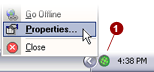
Right-mouse
click on the PlanetDNS Client icon  in the system
tray and select Properties... in the system
tray and select Properties...
Cick the Support
 tab. tab.
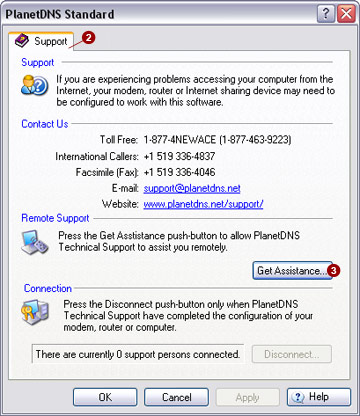
Press the Get
Assistance  button. A Get
Assistance dialog (shown below) will appear. button. A Get
Assistance dialog (shown below) will appear.
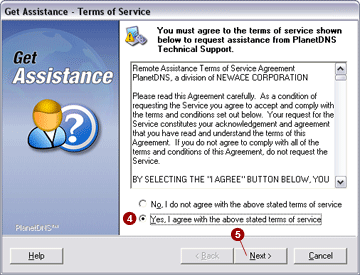
In order for PlanetDNS
Technical Support to assist you remotely on your computer, you must first
read and agree to the Terms of Service. If you agree with the Terms of
Service, select the Yes, I agree with
the above terms of service  option and press the
Next option and press the
Next  button . button .
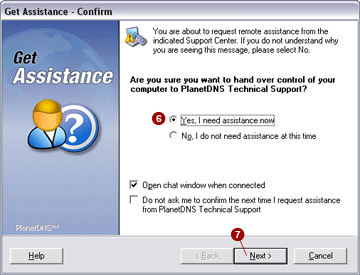
If you are sure you
want to hand over control of your computer to PlanetDNS Technical Support,
select the Yes, I need assistance now
option  . Press the Next . Press the Next
 button to continue. button to continue.
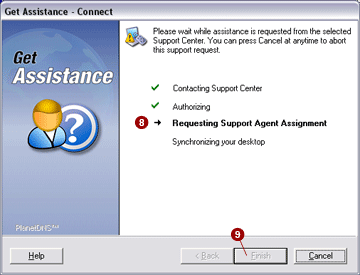
Please wait while the
PlanetDNS Technical Support Center is contacted and you are assigned a
technical support agent  . Once a green check appears to
indicate that a technical support agent has been assigned to you, press
the Finish . Once a green check appears to
indicate that a technical support agent has been assigned to you, press
the Finish
 button. button.
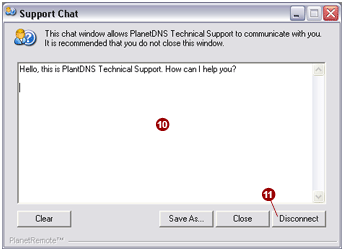
With the Finish
button pressed, the Support Chat
window will appear. Type your question or problem in the text window  provided to communication with your assigned technical support
agent. provided to communication with your assigned technical support
agent.
Disconnecting from PlanetDNS Technical Support
You can disconnect from PlanetDNS Support
at any time by pressing the Disconnect
 button. button.
|
|
