 |
|
 |
| |||
|
| |
|
|
|
| |||
|
| |
|
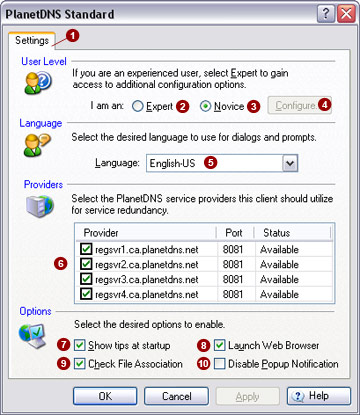
The Settings  tab
allows you to set the software user mode, language, service providers
and additional options. tab
allows you to set the software user mode, language, service providers
and additional options.
User level The software can operate in two user modes: Novice and Expert mode. By default, the software is set to Novice mode, hiding all advanced setting tabs and options in the software. When Expert mode is enabled, all setting tabs will be shown.
Language Select your desired language. Currently, PlanetDNS Client supports the English-US language.
Providers Select all of the PlanetDNS service providers
Options The following PlanetDNS Client options are available for you to enable:
Related Topics
|
|
|
Copyright © 2004 PlanetDNS. All Rights Reserved. |
|

 button to gain access to all of PlanetDNS Client's setting
tabs and advanced options.
button to gain access to all of PlanetDNS Client's setting
tabs and advanced options.
 to maintain an active link to your Internet name and
registration information, so your computer is accessible to you and others
over the Internet.
to maintain an active link to your Internet name and
registration information, so your computer is accessible to you and others
over the Internet.


