 |
|
 |
| |||
|
| |
|
|
|
| |||
|
| |
|
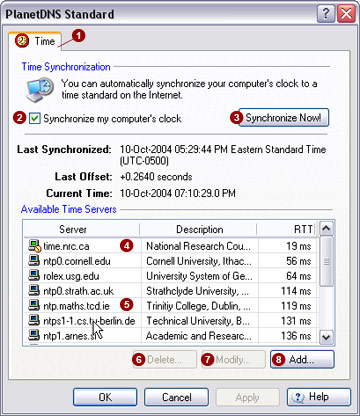
The Time  tab allows
you to synchronize your computer’s clock with a time server on the Internet.
This ensures that your computer’s clock is always set correctly. tab allows
you to synchronize your computer’s clock with a time server on the Internet.
This ensures that your computer’s clock is always set correctly.
Time synchronization Automatically synchronize your computer's
clock to a time standard on the Internet.
Time servers PlanetDNS Client offers 13 predefined time
servers from around the world. The servers are listed in order by round-trip
delay time (RTT) from your location and are re-sorted each time your clock
is synchronized. Each of the listed time standards is then contacted in
succession until a successful time reading can be obtained. The time standard
most recently used is identified with a green icon
You can add a time server by pressing the
Add...
You can modify existing time servers by highlighting
a time server and pressing the
Modify...
To delete a time server, highlight it and
press the Delete...
Firewalls PlanetDNS Client's time plug-in connects to a time standard using TCP Port 123, UDP Port 37 and TCP Port 37 (in that order). Under normal circumstances, you will not be required to open these outgoing ports unless you are behind a corporate firewall.
Related Topics
|
|
|
Copyright © 2004 PlanetDNS. All Rights Reserved. |
|

 .
. button. You
will need to specify the hostname or IP address of the time server and
add a short description.
button. You
will need to specify the hostname or IP address of the time server and
add a short description.  button.
 button.