The Advanced  tab
allows you to control your Internet name (domain name) when you are Online (connected to the Internet)
and Offline (not connected to
the Internet). Most users do not need to change any of the settings found
in this dialog. tab
allows you to control your Internet name (domain name) when you are Online (connected to the Internet)
and Offline (not connected to
the Internet). Most users do not need to change any of the settings found
in this dialog.
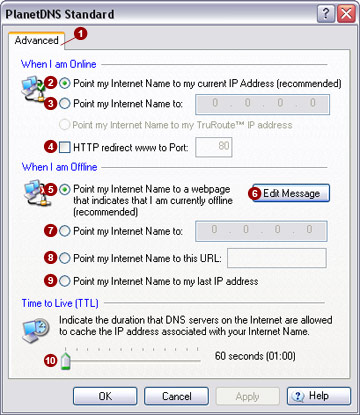
When I am online
You can select various settings and options
that apply when PlanetDNS Client is running.
Point
my Internet name to my current IP address (recommended) 
Select this option to point your Internet name to your computer's current
IP address. This ensures that your chosen Internet name will remain linked
to your computer. This is the recommended setting and should not be changed
unless you are an expert.
Point
my Internet name to 
If your computer is part of a local network, select this option to
point your Internet name to a static IP address. Enter the IP address
that has been assigned to computer and will be associated with your Internet
name.
HTTP
Redirect www to port 
Check this option to enable web port redirection if your Internet service
provider is blocking the standard default website access port (Port 80)
to your computer and you still want to run your own website. Enter an
alternate port (e.g. 8080) that will continue to provide Internet access
to your web server.
 NOTE: Redirection is
available only for www.<yourname>.planetdns.net (or www.yourdomain.com)
and not for <yourname>.planetdns.net, as the latter will require
you the port number that you web server is running on. NOTE: Redirection is
available only for www.<yourname>.planetdns.net (or www.yourdomain.com)
and not for <yourname>.planetdns.net, as the latter will require
you the port number that you web server is running on.
When I am offline
You can select various settings that apply
when PlanetDNS Client is offline (your computer is not connected to the
Internet; your Internet name is not accessible over the Internet).
Point
my Internet name to a webpage that indicates that I am currently offline
(recommended) 
Select this option to show people a webpage that reports you are currently
offline. To show your own customized message on the wepage, select Edit Message  and enter
your message (text only). and enter
your message (text only).
Point
my Internet name to 
Point your Internet name to a static IP address when your computer
is offline by selecting this option.
Point
my Internet name to this URL 
To point your Internet name to a website when your computer is offline,
enter the website address (URL) in the field provided.
Point
my Internet name to my last IP 
Select this option to point your Internet name to your last IP address
when your computer is offline.
Time to Live (TTL)
The Time to Live (TTL) option allows you to
specify the time duration that name servers on the Internet are permitted
to cache (retain) the current IP address associated with your Internet
name. If the IP address assigned to your computer by your ISP changes
rarely, or you have a static IP, you may want to increase the TTL to a
value higher than the default setting to reduce the time it takes to locate
your Internet name.
NOTE:
The recommended default setting  is 60 seconds. It is
important to keep the TTL time as low as possible unless your Internet
service provider rarely changes your IP address when you are connected
to the Internet. is 60 seconds. It is
important to keep the TTL time as low as possible unless your Internet
service provider rarely changes your IP address when you are connected
to the Internet.
Related Topics
|


