 |
The General
 tab is used to create and modify your existing registration
information. Included are your
first and last name, company name, e-mail address and your chosen Internet
name (domain name). tab is used to create and modify your existing registration
information. Included are your
first and last name, company name, e-mail address and your chosen Internet
name (domain name).
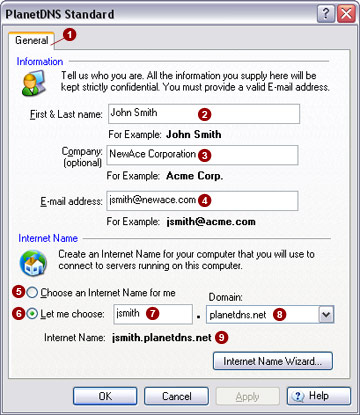
Information
Enter your first and last name, company and e-mail address, as was used
to register your Internet name (domain name).
First & Last
Name 
Enter your first and last name in this field.
Company 
If applicable, enter your company name in this field. If you do not
have a company name, or your PlanetDNS Client is for personal use, you
can leave this field blank.
E-Mail Address

Enter your e-mail address in this field. We require you to enter a
valid e-mail address, as we will use it to send you important registration
information. We do not use your e-mail
address for any other purpose.
Internet name (domain name)
Create your Internet name (domain name)
that you and others will use to connect to your computer over the Internet.
Choose
an Internet name for me 
Select this option if you want the software to choose an Internet name
for your computer. For most users, this
option should not be selected, as the Internet name generated
for your computer will not likely be easy to remember.
Let
me choose: (recommended) 
Select this option if you want to enter your own Internet name in the
text field provided  . You should choose an Internet name
that will be easy for you and others to remember. . You should choose an Internet name
that will be easy for you and others to remember.
Domain

From the domain pull-down list , select the domain of your choice.
The default domain is planetdns.net
Internet
Name: 
Displays the Internet name you have selected. You and others can use
the Internet name (domain name) to access your computer over the Internet.
Related Topics
|
|


