 |
The Security  tab
allows you to specify your security settings. tab
allows you to specify your security settings.
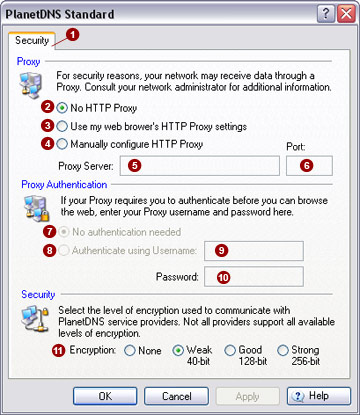
Proxy
If your computer is behind a corporate proxy
server, PlanetDNS Client will need to be configured to use it.
Proxy authentication
No
authentication needed 
Select this option if you do not need to enter a username and password
when browsing the Internet.
Authenticate
using Username 
Select this option if your proxy server requires you to supply a username
and password when you browse the Internet. Supply the username in the
field provided.
Password 
Enter the password in the field provided.
Security
You can select the level of encryption used
for all communications between PlanetDNS Client and PlanetDNS service
providers. Higher levels of encryption provide greater security.
Encryption

You can select three different encryption levels or turn off encryption.
The 40-bit encryption level is the default setting.
 NOTE: Due to U.S. and
Canadian export restrictions on strong encryption (more than 40-bits),
not all service providers support all available encryption options. If
communication problems are encountered, please select a lower level of
encryption. NOTE: Due to U.S. and
Canadian export restrictions on strong encryption (more than 40-bits),
not all service providers support all available encryption options. If
communication problems are encountered, please select a lower level of
encryption. |
|


