 |
Files on the
computer can be downloaded from the
once you have enabled the file transfer function.
 NOTE:
Access to the file transfer window (shown below) is determined by the
method you use to connect to the PlanetRemote-enabled computer. For instructions,
see Accessing files
using the web browser and Accessing
files using the PlanetRemote viewer. NOTE:
Access to the file transfer window (shown below) is determined by the
method you use to connect to the PlanetRemote-enabled computer. For instructions,
see Accessing files
using the web browser and Accessing
files using the PlanetRemote viewer.
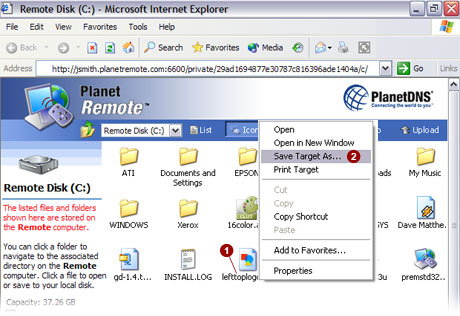
To Download Files from the PlanetRemote-enabled Computer
Right-mouse
click  on the file that you wish to download from the PlanetRemote-enabled
computer. on the file that you wish to download from the PlanetRemote-enabled
computer.
From
the menu, select the Save Target As...
 option. option.
Using the pulldown menu  , specify
the location on your local computer where you want the remote file to
be saved. By default, the remote file will be saved onto the desktop of
your local computer. , specify
the location on your local computer where you want the remote file to
be saved. By default, the remote file will be saved onto the desktop of
your local computer.
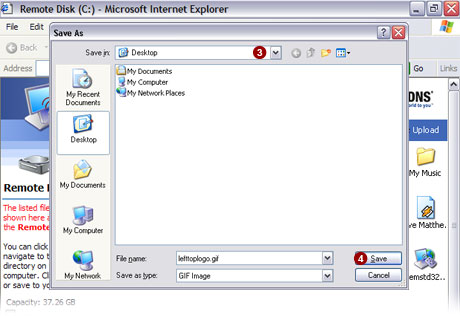
Click the Save
 button to save the remote file to your local computer. button to save the remote file to your local computer.
|
|

