 |
In Expert mode, PlanetRemote will display
all tabs and options. In Novice mode, however, only those tabs that have
been configured previously while the software was in Expert mode will
be visible. To configure PlanetRemote's tabs for Novice users, follow
these steps:
Configuring Tabs for Novice Users
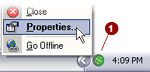
Right-mouse
click on the PlanetDNS Client icon  in the system
tray (along the bottom of your screen against the right corner)
and select Properties... in the system
tray (along the bottom of your screen against the right corner)
and select Properties...
Click the Settings
 tab. tab.
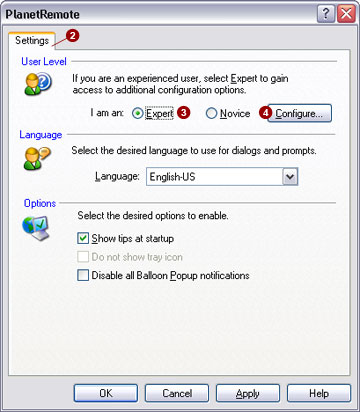
Select the
I am an Expert  option. option.
Press the Configure...
 button, which will bring up the Configure
Tabs... dialog (shown below) button, which will bring up the Configure
Tabs... dialog (shown below)
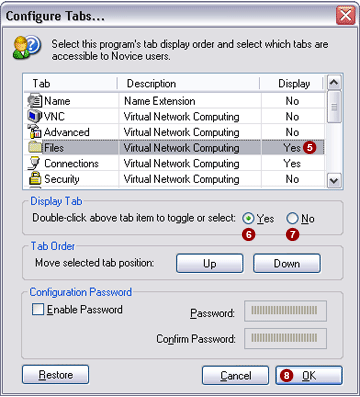
To configure any tab,
point at its name and click once to highlight the row  . .
Select the Yes
 option to show the tab, or select the No option to show the tab, or select the No
 option to hide the tab in Novice mode. option to hide the tab in Novice mode.
Continue steps 5 and
6 for each of the tabs.
When finished, click
the OK  button. button.
|
|

