 |
|
 |
| |||
|
| |
|
|
|
| |||
|
| |
 |
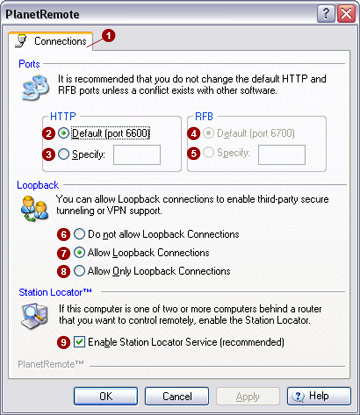
The Connections  tab
allows you to change the ports used by PlanetRemote, set various loopback
options and enable the Station Locator service. tab
allows you to change the ports used by PlanetRemote, set various loopback
options and enable the Station Locator service.
Ports You can specify alternate ports for the HTTP and RFB servers, in case a conflict exists with other software installed on your computer. Currently, the RFB server is offset by +100 from the HTTP port.
Loopback Loopback connections are connections between two locations within your computer - typically not very useful during remote access connections. However, loopback connections are important when you want to control your computer using a security protocol called Secure Shell (SSH). The SSH tunnel receives data in one part of your computer and forwards connection requests to another component of your computer. The process makes a remote control connection through SSH appear as a local connection to Virtual Network Computing (VNC) software.
Station Locator™ The station locator service allows the PlanetRemote-enabled computer to be controlled through a router or firewall. The desktop locator service works in conjunction with the port redirect function, which directs multiple and simultaneous remote control connections to different computers through a single port on your router or firewall.
Related Topics
|
|
|
Copyright © 2004 PlanetDNS. All Rights Reserved. |
|

 .
.


