|
|
 |
| |||
|
| |
|
|
|
| |||
|
| |
 |
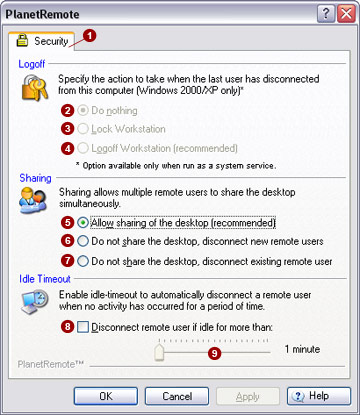
The Security  tab
allows you to set additional security options. tab
allows you to set additional security options.
Logoff Enable additional security options when running PlanetRemote with Windows 2000 or Windows XP. Run PlanetRemote as a system service, so that you will be able to regain control of your desktop after you lock out or logoff your computer (workstation).
Sharing With PlanetRemote's sharing function, multiple remote access users can connect, view and interact with the same local desktop simultaneously.
Idle Timeout You can automatically disconnect a remote user when interaction with the PlanetRemote-enabled computer's desktop has not occurred for a predetermined period of time. Use the slider bar to establish an acceptable time period of inactivity, for up to one minute. Most users will frequently click the left- or right-mouse button, or type on the keyboard. When no such action has occurred for the period of time you have selected, the user will be disconnected. When activated, this function will disconnect all connected remote users, even if the sharing function is enabled.
|
|
|
Copyright © 2004 PlanetDNS. All Rights Reserved. |
|