 |
The Updates  tab can
be used to select the way you want PlanetRemote to notify when software
updates become available. tab can
be used to select the way you want PlanetRemote to notify when software
updates become available.
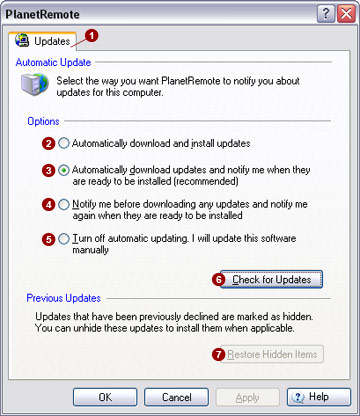
Automatic Updates
Enabling automatic updates ensures that PlanetRemote
and its components (plug-in extensions and help files) remain up-to-date
with the latest versions available from the PlanetDNS website. Select
the option that best meets your needs:
Automatically
download and install updates 
Through this option, PlanetRemote recognizes when you are online and
uses your Internet connection to search for downloads from the PlanetDNS
website. A message will appear in the notification area of your system
task bar when new updates have been successfully downloaded and installed.
Automatically
download updates and notify me when they are ready to be installed

With this option selected, PlanetRemote recognizes when you are online
and uses your Internet connection to search for downloads from the PlanetDNS
website. A message will appear in the notification area of your system
task bar when new updates have been downloaded and are ready to be installed.
Click the icon, or message to view the updates. If you don't want to install
a selected update, click to clear the check box next to it. Critical updates
(i.e., those that are integral to the efficient operation to the software)
cannot be declined. Click Install
to install the selected updates with checked boxes next to them.
Notify
me before downloading any updates and notify me again when they are ready
to be installed 
By selecting this option, PlanetRemote recognizes when you are online
and uses your Internet connection to search for downloads from the PlanetDNS
website. A message will appear in the notification area of your system
task bar when new updates are available to be downloaded. Click the icon
or message to view the updates. If you don't want to download an update,
click to clear the check box next to it. Critical updates (i.e., those
that are integral to the efficient operation to the software) cannot be
declined. Click Download to download
the selected updates.
Turn
off automatic updating. I will update this software manually 
With automatic updating disabled, PlanetRemote will not use your Internet
connection to periodically check for new updates. You will have to manually
check to see if new updates are available on the PlanetDNS website by
pressing the Check for Updates
 button. button.
 NOTE: You can
view a record of installed updates by selecting the Log
tab. NOTE: You can
view a record of installed updates by selecting the Log
tab.
Restore hidden items
Updates that you have declined to install
or download are hidden. You can restore these updates to view and install
them by pressing the Restore Hidden Items
 button. button.
|
|

