 |
Changing your connection speed can either increase the speed and performance
of the updates between the
and the ,
or increase the color resolution. You can change your connection speed
at any time while you are controlling the PlanetRemote-enabled computer.
 NOTE: An increase
in color resolution will decrease responsiveness on the PlanetRemote-enabled
remote desktop. The Default (recommended) setting uses a color resolution
of 8-bit color with high compression to present the remote desktop, which
is a generally accepted setting. NOTE: An increase
in color resolution will decrease responsiveness on the PlanetRemote-enabled
remote desktop. The Default (recommended) setting uses a color resolution
of 8-bit color with high compression to present the remote desktop, which
is a generally accepted setting.
To set your connection speed and color resolution
Login to the PlanetRemote-enabled
computer.
Press the Options
 button. button.
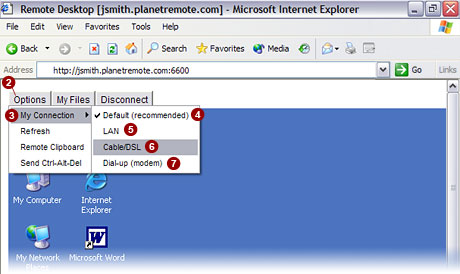
From the menu, highlight the My
Connection  option. option.
Default (recommended)  option option
The default setting is ideal for Cable and DSL Internet connections.
The setting uses 8-bit (256) color with high compression to represent
the PlanetRemote-enabled computer's desktop, requiring a computer with
a 500+ Mhz processor.
LAN  option option
Select this option if the local computer you are using to take control
of the PlanetRemote-enabled computer are part of the same local area network
(LAN). With this option enabled, no compression is used and the color
resolution is set to its maximum of 24-bit True Color.
NOTE: Using this option
over the Internet is not recommended as it will decrease responsiveness
between the local computer and the PlanetRemote-enabled computer's desktop.
If True Color is desired, use the Cable/DSL option.
Cable/DSL  option option
Select this option if the local computer you are using to take control
of the PlanetRemote-enabled computer has a DSL or Cable connection. This
setting uses 24-bit True color with high compression to represent the
PlanetRemote-enabled computer's desktop.
Dial-up (Modem)  option option
This option is similar to the Default setting, but uses a different
compression technique.
Related Topics
|
|

