 |
PlanetRemote can operate in either of two user modes: Novice
or Expert mode. By default, the
software is set to Novice mode, which hides advanced tabs
and options. In Expert mode, all tabs will be visible.
Setting the Software to Expert Mode
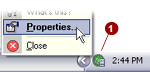
Right-mouse click
on the PlanetRemote icon  in the system tray (along the
bottom of your screen against the right corner)
and select Properties... in the system tray (along the
bottom of your screen against the right corner)
and select Properties...
Click on the Settings
 tab. tab.
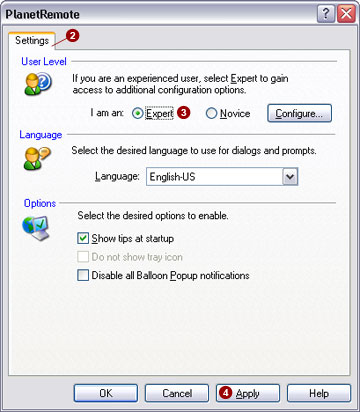
Select the I
am an: Expert  option. option.
Press the Apply
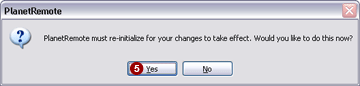
 button, which will cause a process confirmation window
(shown below) to appear. button, which will cause a process confirmation window
(shown below) to appear.
Select the Yes
 button to re-initialize the software and restart PlanetRemote
in Expert mode. button to re-initialize the software and restart PlanetRemote
in Expert mode.
|
|
