 |
The Name
 tab identifies your personal registration information,
as well as the computer name that you will use with PlanetRemote. tab identifies your personal registration information,
as well as the computer name that you will use with PlanetRemote.
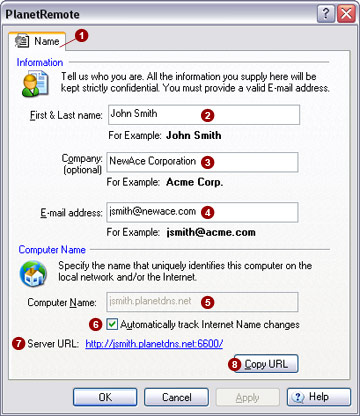
Information
Insert your name, company and e-mail address used for registration.
First & Last
name 
Enter your first and last name.
Company 
Enter your company name, if applicable. If you do not have a company
name or this application is for personal use, you can leave this field
blank.
E-mail Address

Enter your e-mail address. You must enter a valid e-mail address, as
we will send you important registration information that is required for
continued operation of the software. We
do not use your e-mail address for any other purpose. For further information,
click here
to see our privacy policy.
Computer Name
Specify the unique name that will identify
your computer on a local network and the Internet.
Computer
Name 
The computer name, also called hostname or domain name, is unique to
your computer, identifying it on your local network and the Internet.
If you intend to connect to this computer over the Internet from a remote
location, you must choose a name that will be compatible with the IP address
of your computer or external router.
Do not arbitrarily specify a name unless you will be using PlanetRemote
on your local network only.
If you have PlanetDNS Client installed, be sure to click the Automatically track Internet Name changes  option check box. The
function will ensure that your
computer name remains constantly linked with the Internet name you selected
using PlanetDNS Client. option check box. The
function will ensure that your
computer name remains constantly linked with the Internet name you selected
using PlanetDNS Client.
Service
URL 
The service url (Uniform Resource Location, or complete Internet address)
provides you with constant access to the PlanetRemote services.
|
|
