 |
|
 |
| |||
|
| |
|
|
|
| |||
|
| |
|
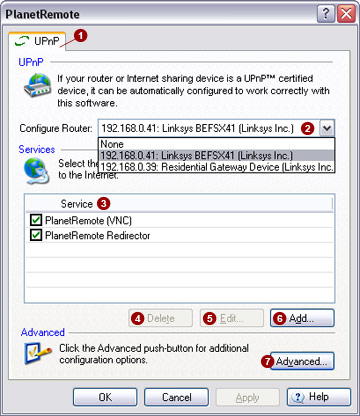
The UPnP™
 tab can be used to automatically configure your router
for services that you want to run with PlanetRemote. tab can be used to automatically configure your router
for services that you want to run with PlanetRemote.
Introduction Universal plug-and-play technology is an industry initiative designed to ease the installation of computer devices and improve their operability.
A typical local network involves a router or other similar device (generally referred to as an Internet gateway device) to connect one or more computers to the Internet. The Internet gateway device will need to be configured, to enable you to run server software on one or more of your network computers.
The configuration of the Internet gateway device usually involves setting up a port forwarding (or virtual server) function, which directs incoming communications onto the appropriate network computer that is running the server software. Unfortunately, the configuration process is not always straightforward and varies among devices. To make the configuration easier, the UPnP™ forum was established. It provides hardware and software vendors with universal standards for the configuration of UPnP™ certified devices.
Some Internet gateway devices offer activated UPnP™ technology from startup. However, other device manufacturers continue to release their products in a form where the UPnP™ function is not automatically activated. In such cases, the user must follow the manufacturer's instructions to manually enable the UPnP™ feature before the Internet gateway device can communicate with compatible software, like PlanetRemote.
In summary, if you want to run server software, such as a web server, FTP server, mail server, or remote access software and use an Internet gateway device to connect to the Internet, you will need to configure the device manually or enable the UPnP™ function.
Security There are legitimate security concerns about UPnP™-enabled Internet gateway devices. It is possible for an unscrupulous person to use the UPnP™ technology to automatically configure your router and gain access to your computer and your files.
Enabling UPnP™ To use UPnP™, select your Internet gateway
device from the Configure Router
Once you have selected your router from the pull-down list, select the desired services you want to make available over the Internet. Select only those services for which you actually have software installed and running on your computer.
Enabling services Select the services you want to make available
over the Internet by placing a check mark in the adjacent boxes on the
Services
If you would like to make available additional
services that are not listed, click the
Add…
To modify an existing service definition,
highlight the appropriate service name and press the Edit…
To disable a service, un-check the adjacent box and press the Apply button. Any port forwarding configuration associated with the service will be disabled automatically as well.
To remove a service, highlight the appropriate
service name and press the Delete
Copyright Click here for copyright notices.
|
|
|
Copyright © 2004 PlanetDNS. All Rights Reserved. |
|
 pull-down list.
 list.
list.
 button.
 button.
 button. Any port forwarding configuration associated
with the service will be removed automatically as well.
button. Any port forwarding configuration associated
with the service will be removed automatically as well.