 |
|
 |
| |||
|
| |
|
|
|
| |||
|
| |
|
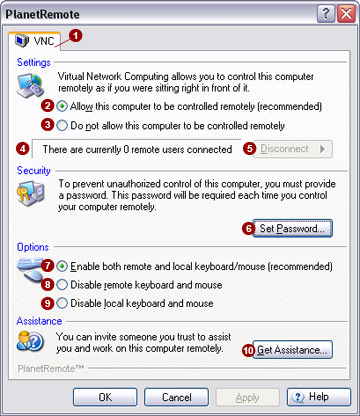
The VNC  (Virtual
Network Computing) tab allows you to enable and disable remote access
to this computer, set your remote login password, configure options and
request assistance from a support center. (Virtual
Network Computing) tab allows you to enable and disable remote access
to this computer, set your remote login password, configure options and
request assistance from a support center.
Settings Virtual Network Computing allows you to control this computer remotely as if you were sitting right in front of it.
Remote Connections You can see how many remote users are connected to this computer using
the remote user field. If no remote user is connected, the field will
indicate There are currently 0 remote
users connected
Security To control your computer remotely, you must specify a password. The
password will be requested each time you want to control your computer
remotely. Click the Set Password
Options This section allows you to control use of the global keyboard and mouse options when your computer is accessed remotely.
Assistance Transfer control of your computer over to a trusted individual or organization
(generally referred to as "Support Centers”), by pressing the Get Assistance…
Related Topics
|
|
|
Copyright © 2004 PlanetDNS. All Rights Reserved. |
|

 in your computer's system tray (along the
bottom of your screen against the right corner), indicating that the unit
is online and ready for remote connections.
in your computer's system tray (along the
bottom of your screen against the right corner), indicating that the unit
is online and ready for remote connections.
 on your computers system tray (along the bottom of
your screen against the right corner), indicating that the unit is offline
and no remote connection can be made.
on your computers system tray (along the bottom of
your screen against the right corner), indicating that the unit is offline
and no remote connection can be made. . To disconnect remote users, press
the
. To disconnect remote users, press
the  button
and select the user you wish to disconnect.
button
and select the user you wish to disconnect. button and specify a password in the


 button.
You can then select the desired support center that will control your
computer.
button.
You can then select the desired support center that will control your
computer.