|
To Upload a File to the PlanetRemote-enabled Computer
- Login
to the PlanetRemote-enabled computer.
- Right-mouse
click on the top bar of the Viewer window
 to open the Properties
menu. to open the Properties
menu.
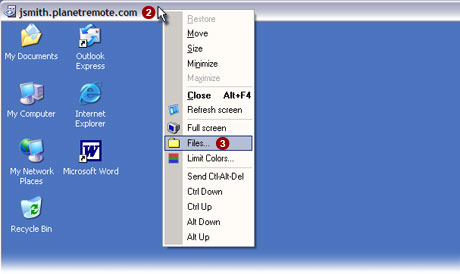
- Select the Files...
 option from the menu. option from the menu.
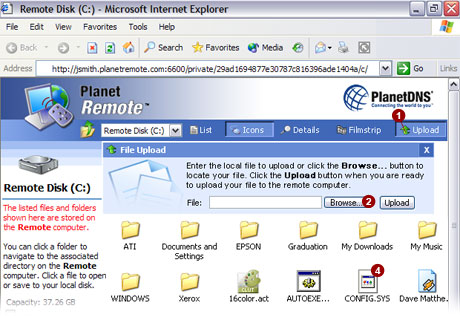
- Browse to the directory on the PlanetRemote-enabled
computer to where you want to upload the file and select the Upload
 button. button.
- Select the Browse...
button.
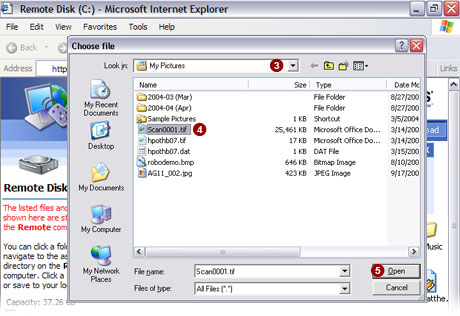
- Using the pulldown menu, choose
the directory where your file is located.
- Click on the file
 you wish to upload
to the PlanetRemote-enabled computer. you wish to upload
to the PlanetRemote-enabled computer.
- Click the Open
 button. button.
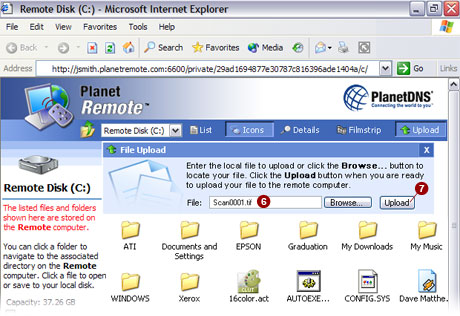
- The file you have chosen to upload is now shown in
the File:
 field. field.
- Press the Upload
 button
to upload the file to the PlanetRemote-enabled computer. button
to upload the file to the PlanetRemote-enabled computer.
|
|