|
|
 |
| |||
|
| |
|
|
|
| |||
|
| |
|
You can start the software by clicking on the PlanetRemote Viewer icon found in the file you specified on your computer when you downloaded the application from the PlanetDNS website. We suggest the software be downloaded to your desktop, as you will want ready access to the application.
To start the software
|
|
|
Copyright © 2004 PlanetDNS. All Rights Reserved. |
|
 on your desktop
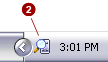
 (along
the bottom of your screen against the right corner).
(along
the bottom of your screen against the right corner).