|
The system menu is available in the Viewer window presenting the PlanetRemote-enabled
computer's desktop and allows you to select various options for the current
remote control session.
Viewing System Menu Options
Login to the remote computer.
Right-mouse click
 anywhere on the top bar of the Viewer window to bring
up the system menu. anywhere on the top bar of the Viewer window to bring
up the system menu.
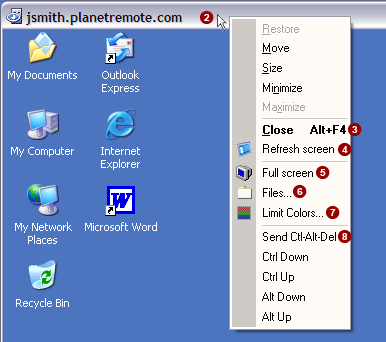
Close (Alt+F4) 
Select this option to close the remote control connection, disconnecting
your Local computer from the PlanetRemote-enabled station.
Refresh screen 
Select this option to re-synchronize the desktop images that appear
on the PlanetRemote-enabled station and on the Local computer.
Full screen 
Select this option to maximize the area of your screen used to present
the image of the PlanetRemote-enabled computer desktop. If the screen
resolution of the PlanetRemote-enabled station is higher than that of
your Local computer, you will see a portion of the desktop image, but
will be able to scroll around the entire area.
Files... 
Select this option if you want to be able to upload and download the
files of the PlanetRemote-enabled computer.
Limit Colors... 
Select this option to increase the responsiveness of your remote control
actions by reducing the resolution of the PlanetRemote-enabled computer's
desktop image to 256 colors (8-bit, low color).
Send Ctrl-Alt-Del 
Select this option to send the Ctrl-Alt-Del command to the PlanetRemote-enabled
computer desktop.
|
|