 |
|
 |
| |||
|
| |
|
|
|
| |||
|
| |
|
The Connect  tab allows
you to easily maintain a listing of available PlanetRemote-enabled stations
on your local network, or the Internet. The list is automatically created
and includes all PlanetRemote-enabled stations that are connected to your
local network. tab allows
you to easily maintain a listing of available PlanetRemote-enabled stations
on your local network, or the Internet. The list is automatically created
and includes all PlanetRemote-enabled stations that are connected to your
local network.
Search If you have a large number of stations on your local area network (LAN) that are shown on the list, you can selectively search for a particular station, or for only those that belong to a certain group.
Search Results PlanetRemote Viewer automatically creates a list of all PlanetRemote-enabled stations on your local network. It also displays the results of your search for a particular station.
Connect to a station on the list by pressing the Connect
Related Topics
|
|
|
Copyright © 2004 PlanetDNS. All Rights Reserved. |
|
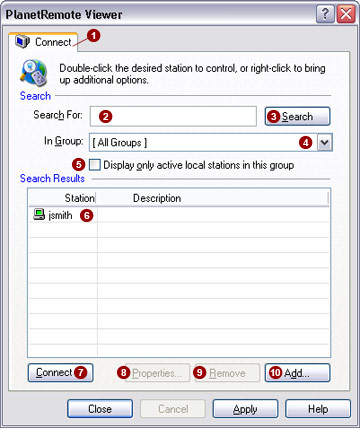

 you wish
to locate and press the
you wish
to locate and press the  button. If you have a large number of stations listed,
the search feature will only display the station's that match your search
criteria.
button. If you have a large number of stations listed,
the search feature will only display the station's that match your search
criteria. .
. button, or by double-clicking on its name listing. To
view the properties of a station, click on its name
button, or by double-clicking on its name listing. To
view the properties of a station, click on its name  button. To remove a station from the list, click on its
name
button. To remove a station from the list, click on its
name  button.