 |
|
 |
| |||
|
| |
|
|
|
| |||
|
| |
|
The Groups  tab allows
you to create groups and assign to them stations that are listed under
the Connect tab. tab allows
you to create groups and assign to them stations that are listed under
the Connect tab.
Groups The stations listed in the Connect tab can be organized into groups. You can define an unlimited number of groups, although each station can only be associated with one group. For example, you can create groups to separate stations on your network
by company department, such as Accounting Add a new group by selecting the Add...
|
|
|
Copyright © 2004 PlanetDNS. All Rights Reserved. |
|
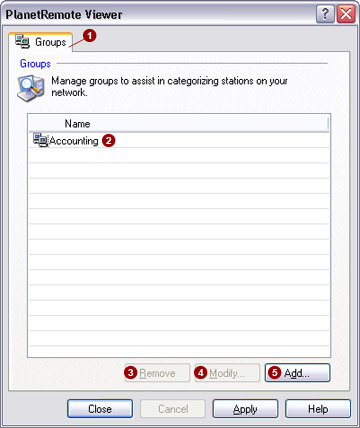
 , Shipping, etc.
 button. To modify the name of an existing group, click
on the group
button. To modify the name of an existing group, click
on the group  button. To remove a group from the list, click on the
group
button. To remove a group from the list, click on the
group  button.